

System Architecture
The Pinpad Getnet software is built on a modular architecture designed to operate as a secure payment peripheral. It processes commands asynchronously, manages transaction states centrally, and ensures a consistent user experience through a managed UI flow.
Internal software structure
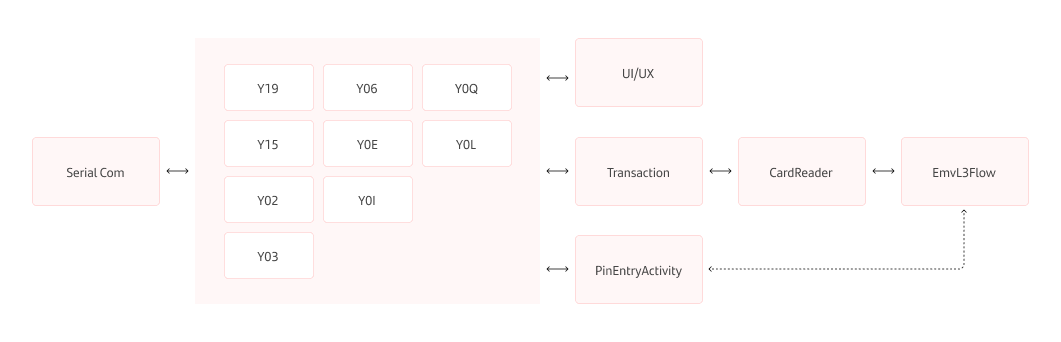
The application architecture consists of specialized modules that interact to manage communication, hardware interfaces, and business logic. This asynchronous design allows the system to maintain multiple commands in different stages of execution simultaneously.
Core modules
SerialCom: A library providing a unified interface for establishing serial communication. It manages port initialization and configuration, including baud rate, data bits, parity, and stop bits.HandlerCommands(Command Orchestrator): The central logic controller responsible for the lifecycle of specific supported commands: Y19, Y02, Y03, Y15, Y06, Y0Q, Y0E, YDL, and Y0I. Each command has its own independent state machine.Transaction: Centralizes all data and statuses for the active transaction, acting as the single source of truth for amounts, card data, and error states.CardReader: Manages physical interactions with card readers (CHIP, CTLSS, BANDA). It monitors reading states and constructs the TLV tags required for host communication.EmvL3Flow: Coordinates the complex EMV protocol. It loads configurations (AIDs/CAPKs) and coordinates authentication. Notably, it automatically launches the PIN request if the card protocol requires it.PinEntryActivity: Manages the secure keyboard for user PIN entry, supporting online, offline, and encrypted offline validation flows as triggered by theEmvL3Flow.
System behavior and UI flow
The application ensures transaction integrity through process persistence and a managed navigation system.
Foreground service
The application runs as an Android foreground service. This ensures the operating system does not terminate the process during active use, maintaining the persistence of serial communication and transaction logic during critical moments.
UI/UX navigation
Navigation is controlled by a specialized NAV function that manages active screens based on the transaction state. Key system screens include:
- IDLE: The base state waiting for an action.
- Waiting for Card: Prompts the user to insert, tap, or swipe a card.
- Application Selection: Used when a card contains multiple Application Identifiers (AIDs).
- Secure Entry: Specific screens for PIN entry, security codes (CDS), or card digit verification.
- Processing: Indicates an operation is in progress.
- Cancelación / Error temporal: Feedback screens for failed or aborted operations.
Related resources
Now that you understand the internal architecture and how modules interact, you can explore the technical handling of different card types and security protocols:
- Card & EMV Handling: how the terminal manages reading technologies, EMV protocols, and technology fallback rules.
- Security and PIN Model: the cryptographic requirements for RSA and DUKPT that ensure the safety of the processed data.
- Pinpad Encryption: which scheme protects each data element, and how the keys are selected.