

PSE

PSE is a real-time online bank transfer payment method in Colombia. At checkout, the customer selects the name of their bank and logs in to their online banking environment. They review the pre-populated payment details, authorize the payment, and then simply wait for the purchase to arrive.
This guide provides instructions for PSE payments, including request examples, redirection handling, and notification processing.
Requirements
Before integrating PSE you need to:
- Generate an access token through the Authentication endpoint.
- Configure a public HTTPS
callback_urlthat receives status updates after customers complete the transaction. - Bank List Retrieval: Call the banklookup endpoint to obtain the list of active banks to display to the customer.
PSE is only available in Colombia and expects COP currency.
Use Cases Specifics
When integrating PSE via Getnet, specific market requirements apply. To know more about the specific requirements of Colombia, be sure to review the resources below before you go live:
Characteristics
The table below summarizes the behavior and requirements for PSE payments.
| Capability | Details |
|---|---|
| Customer interaction | Customer selects bank, redirects to PSE/Bank portal, logs in, and authorizes payment. |
| Confirmation | Asynchronous: initial PENDING status, then APPROVED or DECLINED via webhook. |
| Notifications | Webhooks are required to confirm the final status of the transaction. |
Available features
Use the matrix below to confirm the scenarios currently supported for PSE.
| Payment flow | Supported countries | Purchases | Refunds | Partial refunds | Multiple refunds | Pre-authorizations |
|---|---|---|---|---|---|---|
| Redirect | Colombia | ✅ | ❌ | ❌ | ❌ | ❌ |
Payment Flow
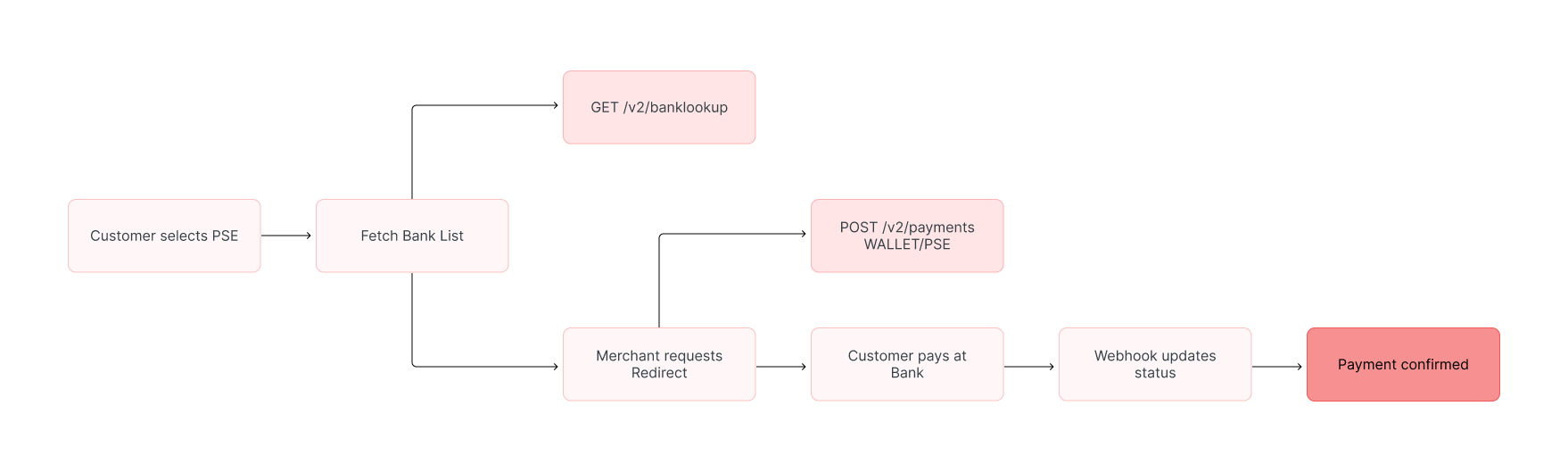
This section guides you through the complete process of implementing PSE payments. The diagram below provides an overview of the PSE payment process:
Supported Flow
This is the payment flow currently supported by Getnet:
- PSE Transfer (
INSTANT_TRANSFER): User selects their bank and is redirected to authorize the debit. Flow is redirect-based.
This operation is asynchronous; the final state is only confirmed when Getnet receives the webhook.
1. Fetching the bank list
Before initiating the payment, you must retrieve the current list of participating financial institutions to display to the customer.
Request to retrieve available banks:
curl --location --request GET 'https://api.pre.globalgetnet.com/dpm/payments-gwproxy/v2/banklookup' \
--header 'Authorization: Bearer <ACCESS_TOKEN>' \
--header 'Content-Type: application/json'
Example response:
{
  "banks": [
    {
      "name": "BANCO DE BOGOTA",
      "code": "1039"
    },
    {
      "name": "BANCO DAVIVIENDA",
      "code": "1051"
    },
    {
      "name": "BANCO UNION COLOMBIANO",
      "code": "1022"
    }
  ]
}Capture the code for the selected bank (for example: 1022) to use in the subsequent payment request.
2. Create the payment request
To initiate a payment, call the Create - Authorize endpoint.
You must specify WALLET as the payment method and provide the brand as PSE. The user’s selected bank code must be passed in additional_data.
The table outlines the minimum fields required for a PSE payment.
| Attribute | Description | Required value |
|---|---|---|
payment_method | Payment method identifier | WALLET |
brand | Brand identifier | PSE |
amount | Transaction amount in cents | Integer (e.g. 400 for $4.00) |
currency | ISO currency code | COP |
payment.instant_transfer.bank_code | Selected Bank Code | String (e.g., 1022) |
customer.document_type | Customer’s ID Type | CC, NIT, etc. |
customer.document_number | Customer’s ID Number | String |
customer.email | Customer Email | Valid email address |
PSE Request Example
curl --location --request POST 'https://api.pre.globalgetnet.com/dpm/payments-gwproxy/v2/payments' \
--header 'Content-Type: application/json' \
--header 'Authorization: Bearer <ACCESS_TOKEN>' \
--data-raw '{
    "idempotency_key": "uuid-pse-v2-unique",
    "request_id": "req-id-v2-unique",
    "order_id": "1234123423128",
    "data": {
        "amount": 400,
        "currency": "COP",
        "customer_id": "customer-uuid",
        "payment": {
            "instant_transfer": {
                "bank_code": "1022"
            },
            "payment_id": "payment-uuid",
            "payment_method": "WALLET",
            "brand": "PSE",
            "soft_descriptor": "PSE TEST"
        },
        "additional_data": {
            "callback_url": "https://your-store.com/webhooks/pse",
            "customer": {
                "email": "customer@email.com",
                "document_number": "50506468",
                "document_type": "NIT",
                "name": "Jose da Silva",
                "phone_number": "34700000000",
                "billing_address": {
                    "street": "Avenida Siempre Viva",
                    "number": "123",
                    "city": "Bogota",
                    "state": "DC",
                    "country": "CO",
                    "postal_code": "110111"
                }
            }
        }
    }
}'The response contains the redirect_url, which must be used to redirect the customer to the PSE portal.
{
  "payment_id": "47b9163c-64f3-41d1-8bd2-69512b9c1419",
  "status": "PENDING",
  "payment_method": "WALLET",
  "redirect_url": "https://gateway.pse.com.co/redirect/token-xyz",
  "reason_message": "Waiting for bank authorization."
}2. User Experience
- The user is redirected to the PSE page.
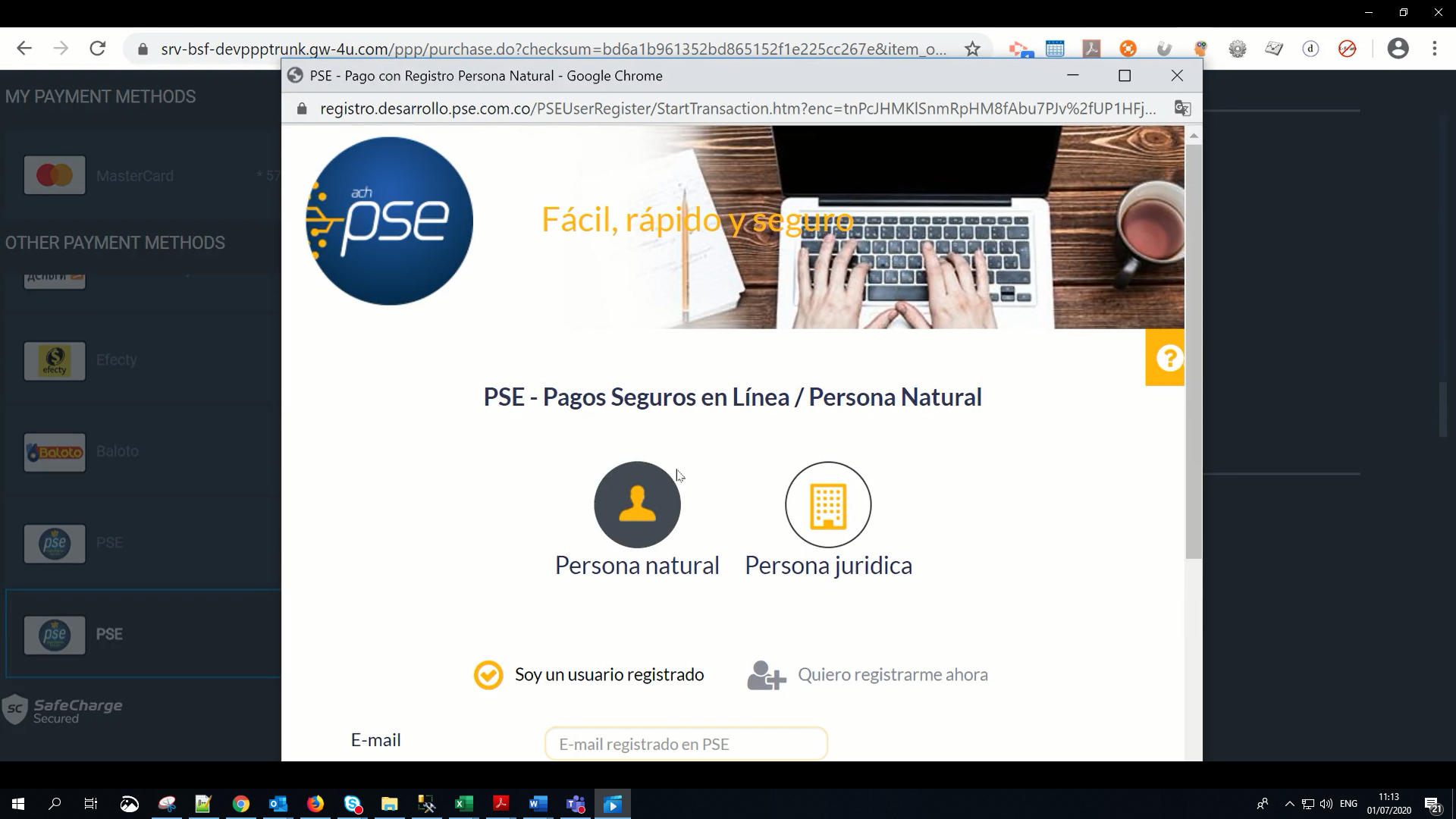
- The user enters their email.
- The user is redirected to their bank to complete the deposit. A payment notification is received.
3. Verify payment status
When the customer completes the payment, a webhook notification is sent to your configured callback_url with the updated payment status (APPROVED or DECLINED).
Always rely on the webhook for the final status, as the customer might close the browser before returning to your site.
Business Rules
payment_methodmust beWALLET.brandmust bePSE.- Currencies supported:
COP. - Payment is an asynchronous operation.
- Refunds: Not supported for this payment method.
- Bank Selection: The
bank_codeis mandatory and must be sourced from the banklookup endpoint.
Read more
- Authentication for token management.