

How to manage the lifecycle of a link
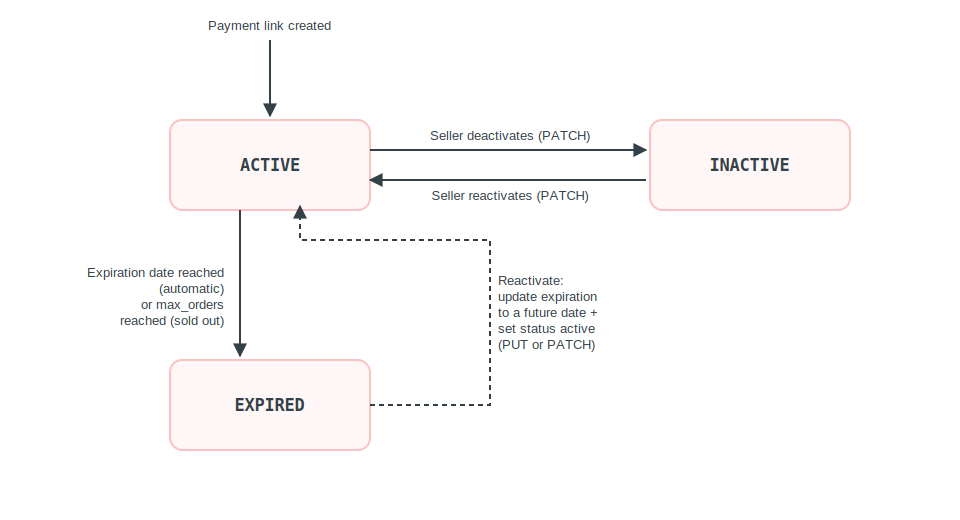
A payment link has three possible statuses: ACTIVE, INACTIVE, and EXPIRED. This guide shows how to transition between them and how to update an existing link.
Status transitions
| From | To | Trigger |
|---|---|---|
| — | ACTIVE | Payment link created |
ACTIVE | INACTIVE | Seller deactivates via PATCH |
ACTIVE | EXPIRED | Expiration date reached (automatic) |
ACTIVE | EXPIRED | max_orders limit reached (sold out) |
INACTIVE | ACTIVE | Seller reactivates via PATCH |
EXPIRED | — | Terminal via automatic transition — see note below |
Reactivating an expired link: a link in
EXPIREDstatus can become active again by updating the expiration date to a future date and setting the status to active. This can be done via either thePUTor thePATCHroute.
How it works
Key characteristics:
- Three statuses: a link is
ACTIVEwhen created,INACTIVEwhen the seller deactivates it, andEXPIREDwhen its expiration date is reached or itsmax_orderslimit is hit (sold out). - PATCH for status or expiration: use
PATCH /payment-links/{link_id}to deactivate, reactivate, or change the expiration date without resending the whole link. - PUT for full replacement: use
PUT /payment-links/{link_id}to replace the entire link; all body fields are replaced, using the same structure asPOST /payment-links. - GET to inspect: retrieve the current state of a link at any time; a non-existent link returns
404(payment_link_not_found). - Reactivating an expired link: an
EXPIREDlink can become active again by updating the expiration to a future date and setting the status to active, via eitherPUTorPATCH.
Before you start
- Obtain an access token. See Authentication.
- Have the
link_idof the link you want to manage.
Deactivate or reactivate a link (PATCH)
Use PATCH to update the status or expiration of a link.
| Endpoint |
|---|
PATCH /payment-links/{link_id} |
| Field | Type | Required | Description |
|---|---|---|---|
status | string | No | New status: ACTIVE or INACTIVE |
expiration | string | No | New expiration date |
Example of request — deactivate
curl -X PATCH "${API_URL}/payment-links/${LINK_ID}" \
    -H "Authorization: Bearer ${ACCESS_TOKEN}" \
    -H "x-seller-id: ${SELLER_ID}" \
    -H "country: BR" \
    -H "tenant: santander" \
    -H "Content-Type: application/json" \
-d '{ "status": "INACTIVE" }'Example of request — reactivate
curl -X PATCH "${API_URL}/payment-links/${LINK_ID}" \
    -H "Authorization: Bearer ${ACCESS_TOKEN}" \
    -H "x-seller-id: ${SELLER_ID}" \
    -H "country: BR" \
    -H "tenant: santander" \
    -H "Content-Type: application/json" \
-d '{ "status": "ACTIVE" }'A successful response returns 200 OK with the complete updated link.
Update a link entirely (PUT)
Use PUT for a full replacement of the link.
| Endpoint |
|---|
PUT /payment-links/{link_id} |
Required fields
| Field | Type | Description | Example |
|---|---|---|---|
label | string | Identification tag (6–36 characters) | black-friday-2026 |
payment | object | Payment configuration | --- |
currency | string | Country currency | BRL or MXN |
products.product_type | string | See valid values in the product data model | physical_goods |
products.title | string | Product title (max: 128) | Camiseta Oficial Getnet |
products.amount | integer | Purchase amount (see note on amounts above) | 15000 |
Optional fields
| Field | Type | Description | Example |
|---|---|---|---|
status | string | Link status | ACTIVE or INACTIVE |
expiration | string | New expiration date | 2026-12-31T23:59:59 |
Example of request
curl https://api-sbx.pre.globalgetnet.com/dpy/payment-link/v1/payment-links/9e5dcedc-1e5f-4e85-9b64-4d0b43d98c82 \
  --request PUT \
  --header 'Authorization: Bearer eyJhbGciOiJSUzI1NiIsInR5cCI6IkpXVCJ9...' \
  --header 'Content-Type: application/json' \
  --data '{
  "label": "black-friday-2026",
  "expiration": "2026-12-31T23:59:59",
  "max_orders": 100,
  "type": "custom",
  "request_delivery_address": false,
  "shipping_amount": 500,
  "products": [
    {
      "product_type": "physical_goods",
      "title": "Camiseta Oficial Getnet",
      "image_id": "6697e354-ab4a-11eb-bcbc-0242ac130002",
      "description": "Camiseta 100% algodão, tamanho M",
      "quantity": 2,
      "order_prefix": "BF2026",
      "amount": 9990,
      "propertyName*": "anything"
    }
  ],
  "payment": {
    "credit": {
      "enabled": true,
      "brands": [
        {
          "enabled": true,
          "brand": "VISA",
          "currencies": [
            "BRL"
          ],
          "threeds": true,
          "supported_installments": [
            {
              "schema": "plan_lojista",
              "schema_name": "Plan Lojista",
              "installments": [2,3,6,9,12],
              "installments_with_interest": [6,9,12],
              "installments_with_increase": [
                {
                  "installments": [3,6,12],
                  "rate": 1.5,
                  "propertyName*": "anything"
                }
              ],
              "propertyName*": "anything"
            }
          ],
          "propertyName*": "anything"
        }
      ],
      "propertyName*": "anything"
    },
    "debit": {
      "enabled": true,
      "brands": [
        {
          "enabled": true,
          "brand": "VISA",
          "currencies": [
            "BRL"
          ],
          "threeds": true,
          "propertyName*": "anything"
        }
      ],
      "propertyName*": "anything"
    },
    "bankslip": {
      "enabled": true,
      "propertyName*": "anything"
    },
    "instant_payment": {
      "enabled": true,
      "propertyName*": "anything"
    },
    "google_pay": {
      "enabled": true,
      "propertyName*": "anything"
    },
    "apple_pay": {
      "enabled": true,
      "propertyName*": "anything"
    },
    "c2p_master": {
      "enabled": false,
      "propertyName*": "anything"
    },
    "propertyName*": "anything"
  },
  "currency": "BRL",
  "propertyName*": "anything",
  "status": "ACTIVE"
}'The request body uses the same structure as POST /payment-links. All body fields are replaced.
See How to create a payment link for the field structure.
A successful response returns 200 OK with the complete updated link.
Retrieve an existing link
To view the current state of a link:
curl -X GET "${API_URL}/payment-links/${LINK_ID}" \
    -H "Authorization: Bearer ${ACCESS_TOKEN}" \
    -H "x-seller-id: ${SELLER_ID}" \
    -H "country: BR" \
-H "tenant: santander"Returns 200 OK with the complete link. A non-existent link returns 404 (payment_link_not_found).